
Google Local Service Ads are one of the easiest ways for roofers to get phone calls from homeowners. You show up at the very top of Google, you only pay when someone actually contacts you, and the Google Guaranteed badge builds instant trust.
But just turning on LSAs and walking away isn’t enough. Most roofing contractors leave money on the table because they don’t know how to optimize their setup. Small changes — like responding faster, picking the right service categories, or disputing bad leads — can cut your cost per lead in half and double the number of real calls you get.
Here’s how to optimize Google Local Service Ads for roofers, step by step.
If you’re still deciding between LSAs and Google Ads, read our comparison post first. → https://stormleadgrowth.com/blog/google-ads-vs-local-service-ads-roofers/
“Most roofing companies don’t lose leads because they lack demand, they lose them because they are invisible when homeowners are ready to hire. Google Local Service Ads give roofers a chance to appear at the exact moment trust and urgency matter most. The companies that optimize response time, reviews, and service targeting are the ones that dominate their local market.” — Nikhil Suman, Founder of StormLead Growth
Step 1: Get Your Google Guaranteed Badge
Before your Local Service Ads can go live, you need to pass Google’s verification process. This is what earns you the Google Guaranteed badge — the green checkmark that appears on your ad.
To get verified, Google will check your business license, insurance coverage, and run background checks on the business owner and any field workers. The exact requirements vary by state, but for most roofing contractors it includes proof of general liability insurance, a valid contractor’s license, and passing a background check.
The process takes anywhere from 2 to 6 weeks. Some roofers get held up because their paperwork is incomplete or their insurance document doesn’t match the name on their Google Business Profile. Before you start, make sure your business name, address, and license details are identical across all your documents.
Once you’re verified, you become a Google Guaranteed roofer. That badge tells homeowners that Google has vetted your business and backs jobs booked through your ad with a guarantee (up to $2,000 if the homeowner isn’t satisfied). That kind of trust is hard to earn any other way.
Step 2: Choose the Right Service Categories
When you set up your LSA profile, Google asks you to select which roofing services you offer. This is important because it controls which searches trigger your ad.
Most roofers just check every box — roof repair, roof installation, roof inspection, gutter repair, siding, and everything else on the list. That seems smart, but it can actually hurt you.
If you check services you don’t really want leads for (like gutter cleaning or minor repairs), you’ll get calls for those jobs and pay for them. Each lead costs money. So only select the services that match the jobs you actually want to book.
For most roofing contractors, the core categories should be roof repair, roof replacement, roof installation, and roof inspection. If you do storm damage work, make sure that’s selected too. Skip anything that doesn’t lead to your higher-value jobs.
You can change these anytime. If you notice you’re getting too many leads for a service you don’t want, just turn it off.
Step 3: Set Your Budget and Service Area Correctly
Google lets you set a weekly budget for your LSAs. Start with something manageable — $500 to $1,000 per week is a reasonable starting point for most roofing companies. You can increase it once you see how the leads are coming in.
Your service area matters just as much as your budget. If you set it too wide, you’ll get calls from homeowners who are too far away. If you set it too narrow, you’ll miss leads in areas you actually serve.
Set your service area to match where your crews actually work. If you cover a 30-mile radius from your office, set that. If you serve specific cities or zip codes, list those. Be realistic — don’t cover areas where you’d turn down a job because of the drive.
Google shows your ad to homeowners based on their distance from your business and whether they’re in your service area. The closer a homeowner is to your location, the more likely your ad will show up.
Step 4: Get More Google Reviews (This Is the Biggest Factor)
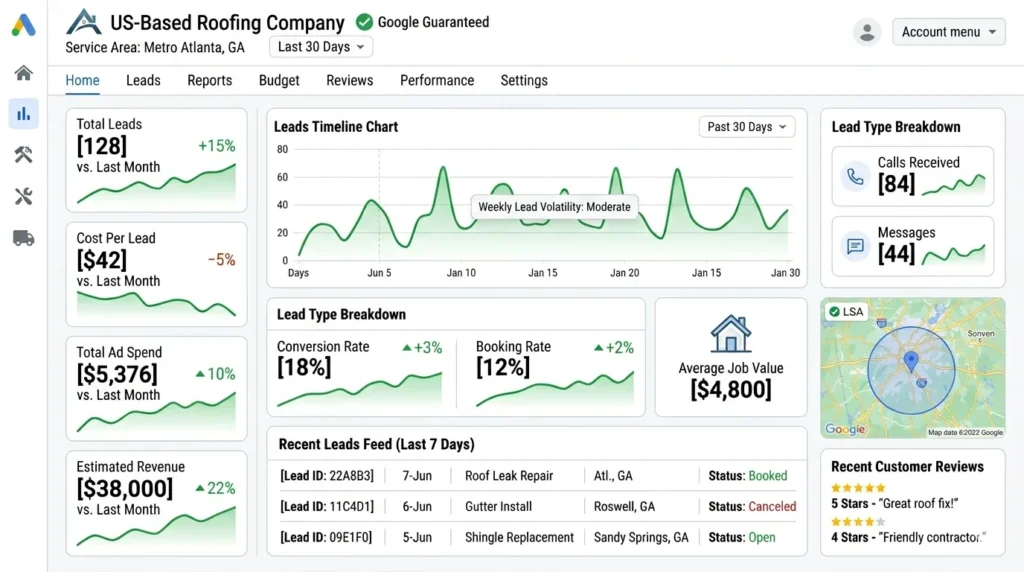
Your star rating and review count are the single most important factor in how often your LSA shows up and how high it ranks compared to other roofers in your area.
A roofing company with 85 reviews and a 4.8-star rating will almost always show above a company with 12 reviews and a 4.5-star rating. Google wants to recommend businesses that homeowners trust, and reviews are the clearest signal of trust.
Here’s how to build reviews consistently:
After every completed job, send the homeowner a text or email with a direct link to leave a Google review. Don’t just say “leave us a review” — send them the actual link so it’s one tap on their phone. Most people are willing to leave a review right after a job if you make it easy.
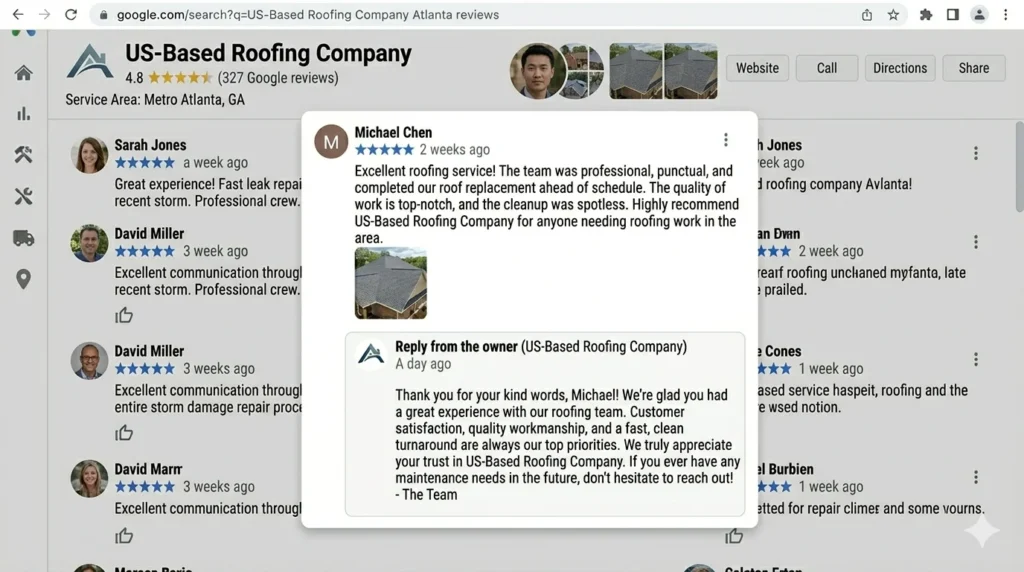
Respond to every review — good and bad. When someone leaves a five-star review, thank them by name and mention the work you did. When someone leaves a negative review, respond professionally, acknowledge the issue, and offer to make it right. Google and future customers both see how you handle feedback.
Never buy fake reviews or offer discounts in exchange for reviews. Google’s filters are getting better at catching this, and getting caught can get your account suspended.
Step 5: Respond to Leads Fast
Google tracks how quickly you respond to leads that come through your LSA. If you’re slow — taking hours to call back or missing calls entirely — Google will start showing your ad less.
The target is to respond within 5 minutes. That sounds aggressive, but homeowners calling from Google are often in a hurry. They’ve got a leak, they need an inspection before an insurance deadline, or they’re getting quotes from multiple companies. The first roofer to answer gets the job more often than not.
If you can’t answer the phone during business hours, use an answering service. There are services built specifically for contractors that will answer, take the homeowner’s info, and text you immediately. That’s better than a missed call that costs you a lead and hurts your LSA ranking.
Set your ad schedule to match when you can actually respond. If nobody’s available on weekends, don’t run your ads on weekends. It’s better to show up only when you can answer than to miss leads and damage your responsiveness score.
Step 6: Dispute Bad Leads
Not every lead you get from LSAs will be real. Some will be spam. Some will be people looking for a service you don’t offer. Some will be from outside your service area. Some will be solicitors trying to sell you something.
Google lets you dispute these leads and get your money back. But you have to do it within 30 days of receiving the lead.
Go into your LSA dashboard regularly — at least once a week — and review every lead. If a call was clearly not a real homeowner looking for roofing work, dispute it. Select the reason (wrong service, spam, out of area) and submit.
Most roofers don’t bother with this and end up paying for 15–20% more leads than they should. Over a year, that adds up to thousands of dollars wasted. Take 10 minutes each week to clean up your leads.
Step 7: Keep Your Profile Complete and Updated
Your LSA profile is essentially your ad. The more complete it is, the better it performs.
Make sure you have:
- A professional profile photo (your logo or a team photo — not a stock image)
- An updated list of services you offer
- Your correct business hours
- Your license and insurance information up to date
If your insurance expires and you don’t upload the new certificate, Google will pause your ads until you do. Set a reminder to update it before renewal dates.
Also keep your Google Business Profile updated and consistent with your LSA profile. Google connects the two, and any mismatches (different address, different phone number, different business name) can cause problems.
Step 8: Track Your Results
The LSA dashboard shows you basic numbers — how many leads you got, how much you spent, your cost per lead. But that’s not enough.
You need to know which leads turned into actual jobs. A lead that cost $40 but turned into a $12,000 roof replacement is a great return. A lead that cost $40 but never answered the phone is worthless.
Track this in a simple spreadsheet or your CRM. For each lead, note whether you reached them, whether you gave an estimate, and whether you booked the job. After a month, you’ll know your real cost per booked job — not just cost per lead. That number is what actually matters.
If your cost per booked job is too high, the issue is usually one of these: your service area is too broad, your reviews need work, you’re not responding fast enough, or you’re not disputing bad leads.
At StormLead Growth, we manage Local Service Ads alongside Google Ads for roofing contractors. We track everything from the initial call to the booked job. Learn more about our Google Ads and LSA management for roofers.
How Long Does It Take for LSAs to Start Working?
Most roofing contractors start seeing their first leads within the first week of going live. Lead volume usually picks up over the first 2 to 4 weeks as Google gathers data on your profile and responsiveness.
If you’ve been running LSAs for more than 3 weeks and you’re getting very few leads, check these things first: Are your reviews strong enough? Is your budget too low? Is your service area too narrow? Are you responding to leads quickly?
If everything looks good and leads are still slow, it might be that your market is very competitive and other roofers with more reviews and longer track records are getting shown first. In that case, focus on building reviews and be patient. It takes time but it works.
Should You Run LSAs Alone or With Google Ads?
LSAs are great on their own, especially for roofers who are just getting started with online marketing. But the strongest setup is running both LSAs and Google Ads together.
LSAs sit at the very top of search results. Google Ads sit right below them. If you’re running both, a homeowner searching “roofer near me” could see your company twice — once in the LSA section and once in the paid ads section. That kind of visibility is hard for competitors to beat.
LSAs bring in the quick, easy leads. Google Ads give you more control — you can target specific keywords, specific neighborhoods, and run ads for specific services. Together, they cover the full picture.
Want both channels working together? See how StormLead Growth builds complete Google Ads systems for roofing contractors— including LSA management, call tracking, and monthly reporting.
Wrapping Up
Google Local Service Ads for roofing contractors are one of the most cost-effective ways to get calls from homeowners. But they only work well when you actively manage them — choosing the right services, building reviews, responding fast, and disputing bad leads.
Most of the roofers we work with at StormLead Growth see their best results when LSAs are running alongside a well-managed Google Ads campaign and a strong local SEO foundation. Each channel supports the other, and together they build a steady flow of leads that doesn’t depend on storms or word of mouth alone.
✦ Want us to manage your LSAs so you can focus on roofing? See how StormLead Growth handles LSA optimization for roofers.